
«Умный дом» - управление освещением с помощью Arduino
21 Jan 2018
local_offer
smarthouse
В процессе ...
Управление освещением - данный проект был начат еще в 2012 году и так и не был доведен до промышленной эксплуатации. Но вот уже более 5 лет эксплуатируется в опытно-промышленном режиме ;). Данный контролер создан на основе Arduino UNO. Управлять освещением можно через WEB-интерфейс или HTTP-запросы либо выключателями без фиксации. У меня дома развернут openHAB
Программное решение, разработанное на Java, которое соединяет компоненты для автоматизации зданий от широкого круга поставщиков на единой платформе, независимо от производителя и протокола.
который и рулит этими контролерами.
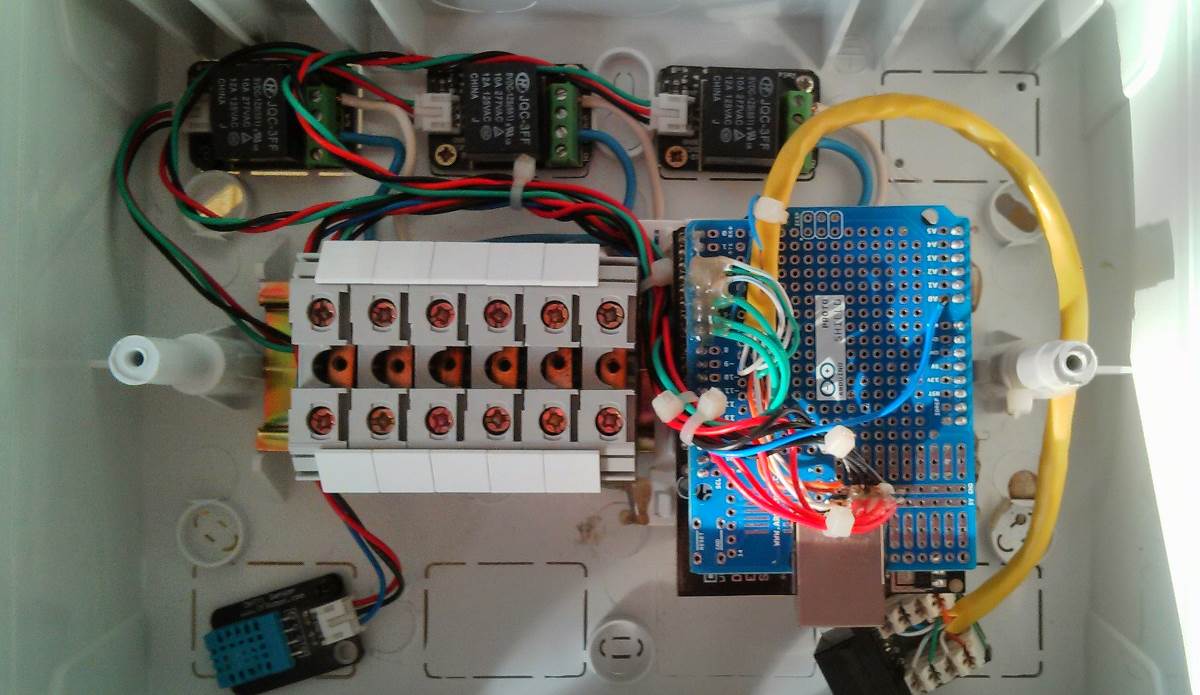
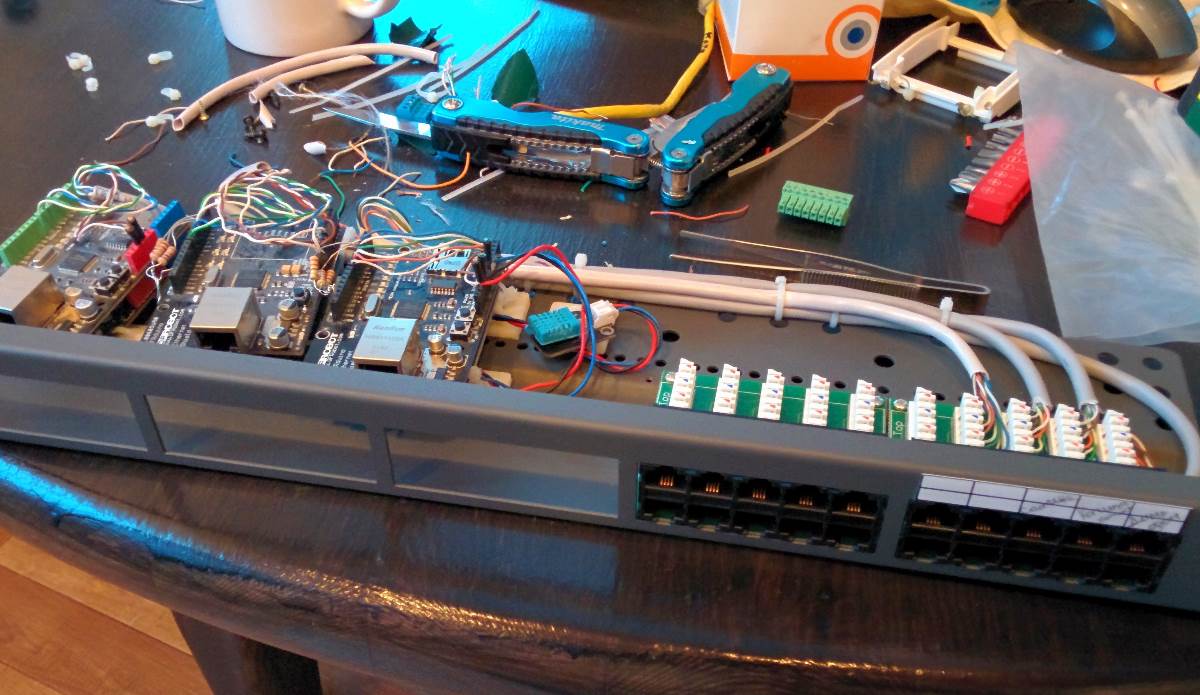
Скетч для Arduino UNO:
```c#
//Контролер 1 (температура, туалет, ванная, детская)
//Добавлен опрос температурного датчмка по сети
//опрос состояний нагрузок через Web-интерйфейс
//

#include <Ethernet.h>
#include <SPI.h>
#include <dht.h>


//network NB: Pins 10, 11, 12 and 13 are reserved for Ethernet module.
byte mac[] = {
  0xDE, 0xAD, 0xBE, 0xEF, 0xFE, 0xED };
byte ip[] = {
  192, 168, 0, 177 };
byte gateway[] = {
  192, 168, 0, 1 };
byte subnet[] = {
  255, 255, 255, 0 };

String inString = String(35);

String Led;

//int led[] = {00, 2, 3, 4 ,5 ,6 ,7 ,8,9  }; //Led pins num 0 in arry is not used
int led[] = {
  00, 5, 6, 7  }; //Led pins num 0 in arry is not used
int numofleds = 3; //numofleds
//String value[] = {"on","on","on","on","on","on","on","on","on"}; //startup all led are off
String value[] = {
  "on","on","on","on"}; //startup all led are off

EthernetServer server(80);
String data;

// создаём объект-сенсор
DHT sensor = DHT();

// кнопки
const int button1Pin = 2;
const int button2Pin = 3;
const int button3Pin = 4;

const int domfRela1 = A1;
const int domfRela2 = A2;
const int domfRela3 = A3;
const int domfRela4 = A4;


int state1 = LOW;      // the current state of the output pin
int reading1;           // the current reading from the input pin
int previous1 = LOW;    // the previous reading from the input pin
int state2 = LOW;      // the current state of the output pin
int reading2;           // the current reading from the input pin
int previous2 = LOW;    // the previous reading from the input pin
int state3 = LOW;      // the current state of the output pin
int reading3;           // the current reading from the input pin
int previous3 = LOW;    // the previous reading from the input pin

int state11 = LOW;
int state21 = LOW;
int state31 = LOW;

long time = 0;         // the last time the output pin was toggled
long debounce = 200;   // the debounce time, increase if the output flickers


void setup()
{
  //Serial.begin(9600);
  Ethernet.begin(mac, ip,gateway,subnet);
  server.begin();

  pinMode(domfRela1, OUTPUT);
  pinMode(domfRela2, OUTPUT);
  pinMode(domfRela3, OUTPUT);
  pinMode(domfRela4, OUTPUT);


  //set pin mode
  for (int j = 1; j < (numofleds + 1); j++){
    pinMode(led[j], OUTPUT);
  }
  //Serial.println("Serial READY");
  //Serial.println("Ethernet READY");
  //Serial.println("Server READY");


  pinMode(button1Pin, INPUT);
  pinMode(button2Pin, INPUT);
  pinMode(button3Pin, INPUT);

  // методом attach объявляем к какому контакту подключен
  // сенсор. В нашем примере это нулевой аналоговый контакт
  sensor.attach(A0);
  //
  // после подачи питания ждём секунду до готовности сенсора к работе
  delay(1000);

}

void loop()
{


  EthernetClient client = server.available();

  if(client){
    // an http request ends with a blank line
    boolean current_line_is_blank = true;
    while (client.connected()) {

      if(client.available()) {

        char c = client.read();
        // if we've gotten to the end of the line (received a newline
        // character) and the line is blank, the http request has ended,
        // so we can send a reply
        if (inString.length() < 35) {
          inString.concat(c);
        }

        if (inString.indexOf("temperature")>0) {
            client.println("HTTP/1.1 200 OK");
             client.println("Content-Type: text/html");
             client.println();
            //client.println("<p>" + TempValue() + "</p>");
            client.println(TempValue());
          break;
        }
        if (inString.indexOf("stLed0")>0) {
             client.println("HTTP/1.1 200 OK");
             client.println("Content-Type: text/html");
             client.println();
             client.print(digitalRead(led[1]));
             client.print("; ");
             client.print(digitalRead(led[2]));
             client.print("; ");
             client.print(digitalRead(led[3]));

          break;
        }

        if (inString.indexOf("stLed1")>0) {
            client.println("HTTP/1.1 200 OK");
             client.println("Content-Type: text/html");
             client.println();
            client.println(digitalRead(led[1]));
          break;
        }
        if (inString.indexOf("stLed2")>0) {
            client.println("HTTP/1.1 200 OK");
             client.println("Content-Type: text/html");
             client.println();
            client.println(digitalRead(led[2]));
          break;
        }
        if (inString.indexOf("stLed3")>0) {
            client.println("HTTP/1.1 200 OK");
             client.println("Content-Type: text/html");
             client.println();
            client.println(digitalRead(led[3]));
          break;
        }

        if(inString.indexOf("domofone=Domofone")>0){
           //Открытие двери на домофоне
              digitalWrite(domfRela1, HIGH);
              delay(250);
              digitalWrite(domfRela2, HIGH);
              delay(250);
              digitalWrite(domfRela2, LOW);
              delay(250);
              digitalWrite(domfRela1, LOW);

             client.println("HTTP/1.1 200 OK");
             client.println("Content-Type: text/html");
             client.println();
             client.print("OK");
             break;
        }


        if (c == '\n' && current_line_is_blank) {

          // send a standard http response header
          client.println("HTTP/1.1 200 OK");
          client.println("Content-Type: text/html");
          client.println();
          client.println("<html>");
          //client.println("<META http-equiv='refresh' content=180,'http://192.168.0.177'>");
          client.println("<body>");

          //client.println("<img src='http://192.168.0.180/jhome/images/logo_160_160.jpg' title='Home manage' alt='Home manage'>");
          //client.println("<br>");
          //client.println("<a href='http://192.168.0.180/jhome'>Home manage</a>");
          //client.println("<p>");
          client.println("<form method=get>");


          for(int i=1;i < (numofleds + 1) ;i++){
            Led = String("led") + i;

            if(inString.indexOf(Led+"=on")>0 || inString.indexOf("all=on")>0){
              //Serial.println(Led+"on");
              digitalWrite(led[i], HIGH);
              value[i] = "off";
              if (i == 1) state11 = HIGH;
              if (i == 2) state21 = HIGH;
              if (i == 3) state31 = HIGH;
            }
            else if(inString.indexOf(Led+"=off")>0 || inString.indexOf("all=off")>0 ){
              //Serial.println(Led+"on");
              digitalWrite(led[i], LOW);
              value[i] = "on";
              if (i == 1) state11 = LOW;
              if (i == 2) state21 = LOW;
              if (i == 3) state31 = LOW;

            }
            client.println("<br>"+Led+"  <input type=submit name="+Led+" value="+value[i]+">");
          }

          if(inString.indexOf("domofone=Domofone")>0){
           //Открытие двери на домофоне
              digitalWrite(domfRela1, HIGH);
              delay(250);
              digitalWrite(domfRela2, HIGH);
              delay(250);
              digitalWrite(domfRela2, LOW);
              delay(250);
              digitalWrite(domfRela1, LOW);

            }

          client.println("<br>All <input type=submit name=all value=on><input type=submit name=all value=off>");

             client.println("<br>Domofone: <input type=submit name=domofone value=Domofone>");

          client.println("<p>");
          client.println("<a href='/?temperature'>Temperature</a>");

          client.println("<p>Copyright  ©  2012 Pavel Satin </p>");
          client.println("</form></body></html>");
          break;
        }
        if (c == '\n') {
          // we're starting a new line
          current_line_is_blank = true;
        }
        else if (c != '\r') {
          // we've gotten a character on the current line
          current_line_is_blank = false;
        }
      }
    }
    // give the web browser time to receive the data
    delay(400);
    inString = "";
    client.stop();
  }

  ///////////////////////////////////////////////
  // Обрботка кнопок
  ///////////////////////////////////////////////

  int reading1 = digitalRead(button1Pin);
  int reading2 = digitalRead(button2Pin);
  int reading3 = digitalRead(button3Pin);


  if (reading1 == HIGH && previous1 == LOW && millis() - time > debounce) {
    if (state1 == HIGH || state11 == HIGH)
    {
      state11 = LOW;
      state1 = LOW;
    }
    else if (state1 == LOW || state11 == LOW)
    {
      state11 = HIGH;
      state1 = HIGH;
    }
    time = millis();

  }

  digitalWrite(led[1], state11);

  previous1 = reading1;


  if (reading2 == HIGH && previous2 == LOW && millis() - time > debounce) {
    if (state2 == HIGH  || state21 == HIGH)
    {
      state21 = LOW;
      state2 = LOW;
    }
    else if (state2 == LOW || state21 == LOW)
    {
      state21 = HIGH;
      state2 = HIGH;
    }

    time = millis();


  }
  digitalWrite(led[2], state21);

  previous2 = reading2;


  if (reading3 == HIGH && previous3 == LOW && millis() - time > debounce) {
    if (state3 == HIGH || state31 == HIGH)
    {
      state31 = LOW;
      state3 = LOW;
    }
    else if (state3 == LOW || state31 == LOW)
    {
      state31 = HIGH;
      state3 = HIGH;
    }

    time = millis();

  }


  digitalWrite(led[3], state31);

  previous3 = reading3;


  ////////////////////////////////////////////

}


String TempValue()
{

  // метод update заставляет сенсор выдать текущие измерения
  sensor.update();

  char msg[128];

  switch (sensor.getLastError())
  {
  case DHT_ERROR_OK:

    // данные последнего измерения можно считать соответствующими
    // методами
    //sprintf(msg, "Temperature = %dC, Humidity = %d%%",
    //sensor.getTemperatureInt(), sensor.getHumidityInt());
    sprintf(msg, "_%d_%d_",
        sensor.getTemperatureInt(), sensor.getHumidityInt());

    break;
  case DHT_ERROR_START_FAILED_1:
    //msg = "Error: start failed (stage 1)";
    break;
  case DHT_ERROR_START_FAILED_2:
    //msg = "Error: start failed (stage 2)";
    break;
  case DHT_ERROR_READ_TIMEOUT:
    //msg = "Error: read timeout";
    break;
  case DHT_ERROR_CHECKSUM_FAILURE:
    //msg = "Error: checksum error";
    break;
  }

  return msg;

}


```